🎉 We just launched 3 new features! Find out more:

Debugger
AI Translation
AI Rephrase
blog single image
blog single image
User Onboarding & Engagement

15 Customer Onboarding Best Practices: A Complete Guide

blog author
Nicole Schreiber-Shearer

March 30, 2026

Customer onboarding is one of the most important stages of the SaaS customer journey. Most SaaS users who churn do so within the first 90 days, well before they ever see the full value of the product. It's the moment when new users learn what your product does, how it works, and why it matters. When onboarding is clear and supportive, customers reach value quickly. When it's confusing or overwhelming, customers get stuck and often leave before they see what your product can do.

This guide walks through the best practices for customer onboarding. These ideas help SaaS teams reduce churn, improve retention, and build a smooth path from signup to success.

Why Customer Onboarding Matters

Customer onboarding sets the user's first impression of your product. It shows users how to get started and gives them the confidence to take the next step. When onboarding works well, customers activate faster, explore more features, and stay engaged longer.

Strong onboarding leads to: 

  • Faster product adoption
  • Fewer support questions
  • Lower early churn
  • Higher customer satisfaction
  • Stronger long-term loyalty

Without a clear onboarding experience, even great products can lose users early. That's why every SaaS team needs a simple, structured onboarding strategy that guides people to value—and the right product adoption tools to deliver it at scale.

Now that we understand why customer onboarding matters, let's look at the best practices that help you build an onboarding experience that works for every new user.

1. Understand Customer Goals Before Onboarding Begins

What it is

Understanding the customer's goals means learning what each new user wants to achieve with your product. Every customer arrives with a different job-to-be-done, skill level, and expectation.

Why it matters

Customer onboarding only works when it helps people reach their desired outcomes. If you don't know those outcomes, you can't guide them to value. Clear goals make it possible to personalize onboarding, shorten time-to-value, and reduce early churn.

How to do it

  • Ask early questions. Use short onboarding surveys or setup forms to learn the customer's role, goals, and top tasks.
  • Create simple personas. Group customers by common traits—job role, company size, or primary use case.
  • Watch behavior. Track which features customers explore first, where they hesitate, and what they skip.‍
  • Align first steps with goals. Guide each persona toward the single action that delivers their first meaningful win.

2. Create a Clear and Structured Onboarding Plan

What it is

A structured onboarding plan is a simple, step-by-step path that guides new customers through the most important actions in your product. It removes guesswork and shows customers exactly what to do first, next, and last

Why it matters

Customers often drop off because they arrive inside the product and don't know where to begin. A clear plan reduces confusion, lowers cognitive load, and helps people reach value faster. It also keeps your onboarding consistent across all customers, no matter their experience level.

How to do it

Use an onboarding checklist to give customers a small set of tasks to complete, such as account setup, importing data, or exploring a key feature. Break big actions into small steps, and start with the first win—put the most valuable action at the top of the checklist so customers see results quickly. Keep the plan short: five to seven steps is usually enough to get customers moving without overwhelming them.

3. Send a Welcome Email to Get Users Started

What it is

A welcome email is the first message new customers receive after signing up. It introduces your product, explains what to do next, and guides customers toward their first steps inside the product.

Why it matters‍

The welcome email sets the tone for the entire onboarding experience. It gives customers direction before they even open the product, which reduces confusion and increases the chance they come back. A clear welcome email also helps customers reach their first win faster, leading to stronger activation and lower early churn.

How to do it

Highlight key features—point customers toward the features that matter most on day one. Link to your onboarding checklist so they know exactly what to do first. Offer a clear contact path by sharing support or success contact details so customers feel supported from the start. And keep it short: a friendly, focused message performs better than a long, detailed one.

4. Provide Personalized Experiences

What it is

Personalized onboarding gives each customer a path that matches their role, goals, and behavior. Instead of sending every user through the same steps, you tailor the experience so each person gets guidance that fits their needs.

Why it matters

Customers stay more engaged when the product feels relevant to them. Personalization reduces unnecessary steps, shortens time-to-value, and helps people focus on what they came to do. It also builds confidence, because every action feels intentional rather than generic.

How to do it

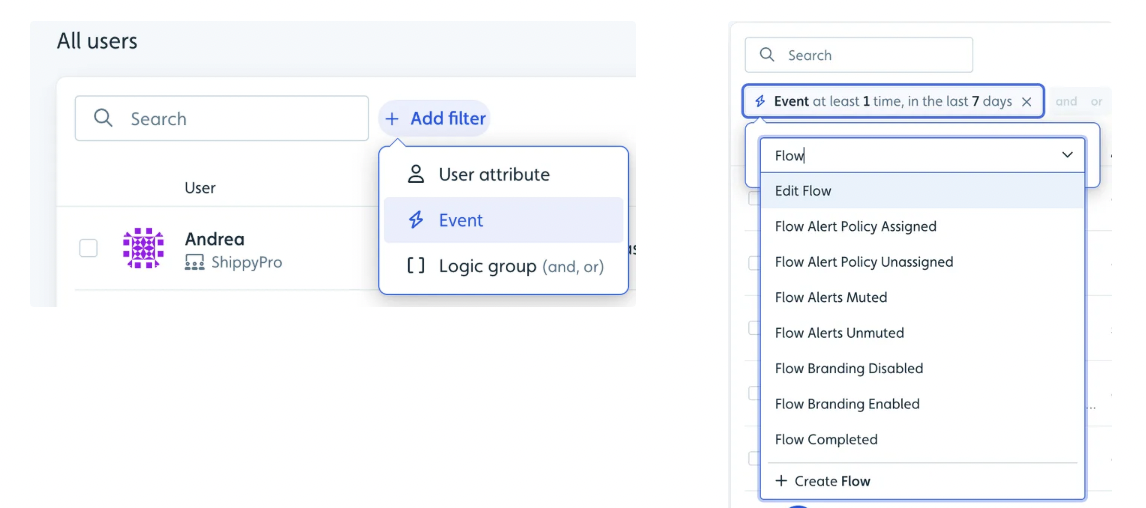
Segment customers by job role, experience level, or primary goal. Use dynamic paths to adjust the onboarding experience based on what customers have already done—skip steps that are no longer needed. Send in-app messages that offer tips and suggestions based on real actions, and guide customers to the next best step without interrupting their work.

With Userflow, you can build segmented Tours & Guides and Checklists that adapt to each user's role or behavior, no engineering required. FlowAI analyzes product signals to help surface the right experience for the right user at the right moment, so personalization scales automatically as your user base grows.
‍

Example of User Segmentation

5. Provide Contextual Onboarding

What it is

Contextual onboarding gives customers help at the exact moment they need it. It includes in-product Tours & Guides, tooltips, and checklists that appear inside the interface and explain how to use key features.

Why it matters

Customers learn faster when guidance shows up in the right place, at the right time. Contextual onboarding reduces the learning curve, prevents confusion, and builds confidence. It keeps people moving forward without forcing them to leave the product or search for answers elsewhere.

How to do it‍

Use Tours & Guides to offer short, step-by-step walkthroughs that explain core features and help customers complete important actions. Add tooltips to give quick tips or definitions when customers hover or click on specific elements. Include interactive checklists to show progress and nudge customers toward the next key step. Keep guidance brief; short, focused messages work better than long explanations.

This is also where AI-native tools change the equation. Userflow's Adoption Agent lives directly inside your customers' product, answering questions in context, recommending the relevant walkthrough, and launching it—turning a support moment into a product adoption moment.

Want to build onboarding experiences like these without engineering support? Try Userflow for free.

6. Assign Small, Achievable Milestones

What it is

Small milestones are simple goals customers can complete early in their onboarding journey. These goals help break complex tasks into manageable steps and give customers quick wins.

Why it matters

People stay motivated when they see progress. Small wins build confidence, reduce overwhelm, and encourage customers to keep exploring your product. They also help users experience value faster, which improves activation and reduces early churn.

How to do it

Use checklists to show clear steps and let customers track their progress. Highlight quick wins by starting with easy actions like completing a profile or trying one core feature. Give positive feedback with small messages or visuals to congratulate users when they finish a step. And stay focused—keep early milestones simple so customers never feel stuck.

7. Track Key Onboarding Metrics

What it is

Tracking onboarding metrics means measuring how customers move through your onboarding experience. These metrics help you understand where users succeed, where they struggle, and what needs improvement.

Why it matters

You can't improve onboarding without clear data. Metrics show you which steps slow customers down, how long it takes to reach value, and which features matter most. Strong measurement helps teams reduce churn and create a smoother experience over time.

How to do it

Track onboarding completion rate to measure how many customers finish your onboarding experience; low completion often signals confusion or friction. Monitor time-to-first-value to see how long it takes for customers to reach their first meaningful win. Watch feature adoption to understand which features customers use during onboarding and which they skip. And review early churn rate to assess whether onboarding changes are reducing cancellations in the first days or weeks.

Userflow's per-content analytics and Dashboard give you step-level funnel data across your Tours & Guides, Checklists, and Launchers—so you can see exactly where users drop off and act on it fast.

8. Provide Continuous Support After Onboarding

What it is

Continuous support is the guidance customers receive after they finish the main onboarding steps. It includes helpful resources, follow-up communication, and ongoing check-ins that keep customers confident as they explore more of the product.

Why it matters

Onboarding doesn't stop at the first login. If customers run into problems later, they may get stuck or disengage. Continuous support helps people grow with your product, discover new features, and build long-term habits that lead to stronger retention.

How to do it

Offer a Resource Center to give customers quick access to articles, FAQs, and tutorials so they can solve problems on their own. Send follow-up emails sharing extra tips, product updates, or short training resources that help them deepen their usage. Schedule success check-ins for complex products, and stay proactive by surfacing help before customers ask for it, especially after new feature releases.

9. Collect Feedback and Continuously Improve

What it is

Collecting feedback means asking customers about their onboarding experience and using their responses to make the experience clearer, faster, and easier. Feedback helps you understand what works well and what causes confusion.

Why it matters

Customers see problems you might miss. Their input shows where people get stuck and which steps feel smooth. When you act on feedback, onboarding becomes more effective, and customers feel heard and supported, leading to higher satisfaction and better retention.

How to do it

Use in-app surveys to ask short questions right after customers finish onboarding while the experience is fresh in their minds. Reach out directly via email or through your success team to gather deeper insights. Improve regularly by reviewing feedback and making small updates. And close the loop—let customers know when their feedback leads to change. It builds trust and encourages future input.

Userflow's Surveys and NPS tools let you capture feedback directly in-app, triggered at the exact moments that matter. FlowAI Signals surfaces emerging themes automatically, so your team knows what to prioritize without manually digging through responses.

10. Incorporate Gamification in Onboarding

What it is

Gamification uses simple game-like elements—such as progress bars, badges, and rewards—to make onboarding feel more fun and motivating. It turns learning the product into a series of small, engaging challenges.

Why it matters

People are more likely to finish onboarding when it feels enjoyable. Gamification encourages customers to explore features, complete tasks, and stay active. When customers have a positive first experience, they are more likely to return and form long-term habits.

How to do it

Use progress bars to show how far customers have come and how much is left. Reward milestones with small visual rewards or encouraging messages. Offer badges or achievements to give customers a sense of accomplishment as they explore the product. And keep it light; gamification should support learning, not distract from it.
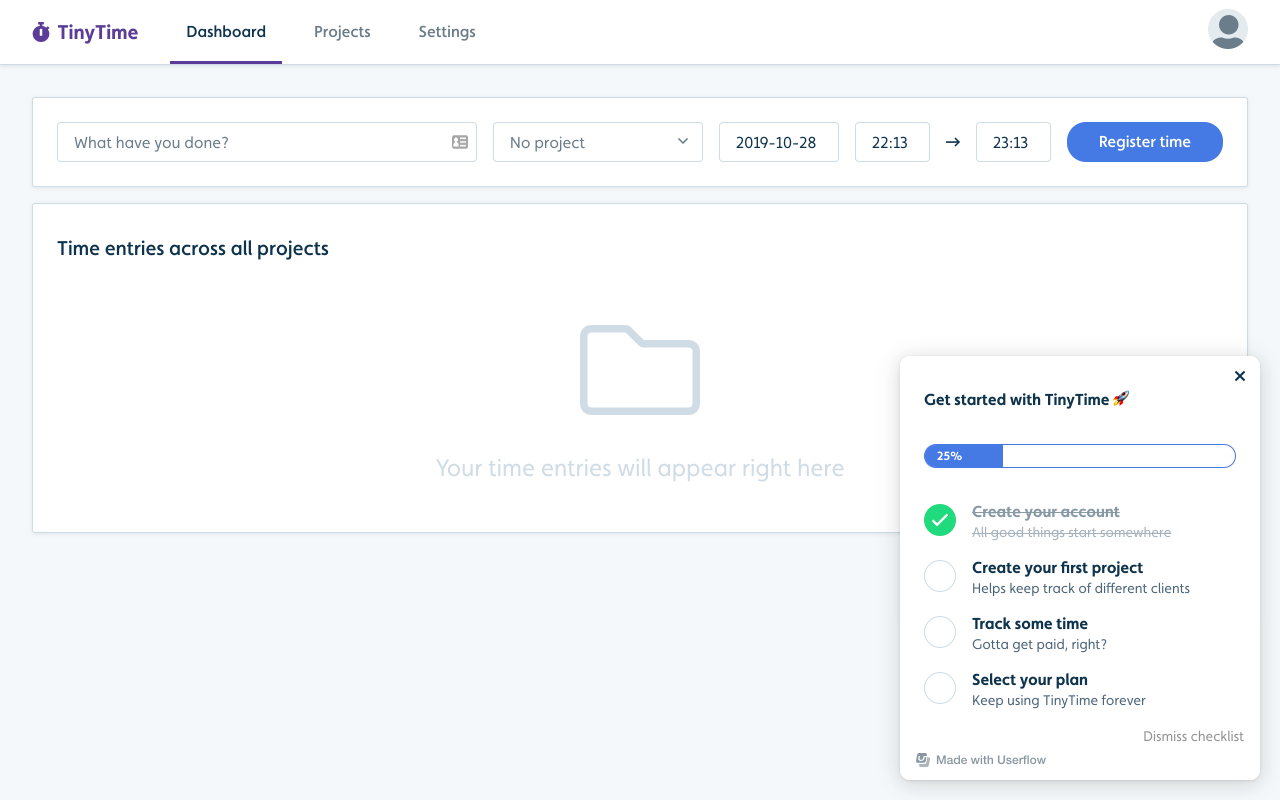
Example of a checklist with a progress bar

11. Provide Self-Serve Resources for Users

What it is

Self-serve resources are on-demand materials like help articles, FAQs, videos, and community forums that customers can use to learn at their own pace without waiting for support.

Why it matters

Not every customer wants or needs a guided walkthrough. Many prefer solving problems on their own. Self-serve resources make this possible by giving customers quick access to clear answers—reducing support load, encouraging deeper product exploration, and building long-term confidence.

How to do it

Build a simple knowledge base with easy-to-read articles that explain common tasks and features. Add video tutorials to help customers learn workflows visually. Support community learning by giving users a place to ask questions, share ideas, and learn from others. And keep everything easy to search—clear navigation and strong keywords help users find answers fast.

Userflow's Resource Center lets you surface all of this directly inside your product, so users never have to leave the interface to find help.

12. A/B Test Your Onboarding Flows

What it is

A/B testing compares two versions of an onboarding step to see which one performs better. You can test different messages, layouts, guides, or the order in which features are introduced.

Why it matters

You can't assume which version of onboarding will work best. A/B testing gives you clear data on what helps customers activate faster, complete more steps, and stay engaged longer. It also shows how different user segments respond, which leads to more personalized onboarding over time.

How to do it

Test one change at a time so you know what caused the difference. Compare different Tours & Guides, Checklists, or first steps to see which path creates quicker wins. Measure activation and retention, and use results to refine. Small improvements add up.

13. Develop a Strategy for Upsells and Cross-Sells

What it is

Upsell and cross-sell onboarding guides existing customers through new features, add-ons, or higher-tier plans. It gives users clear steps to understand what's new and how to get value from it.

Why it matters‍

Even long-time customers need support when upgrading. Without guidance, customers may ignore new features or feel unsure about how to use them. A dedicated onboarding path for expansions helps users adopt upgrades quickly, increases product value, and strengthens long-term retention.

How to do it‍

Create separate onboarding paths by building Tours & Guides or Checklists specifically for add-ons or advanced features. Show the new value by explaining how the upgrade solves a problem or expands what the customer can do. Offer optional support through short tutorials or success check-ins for customers who want more help. And use timely in-app prompts to surface guidance right where and when the customer needs it.

14. Create a Coherent Brand Experience Throughout Onboarding

What it is

A coherent brand experience means that everything a customer sees during onboarding—text, visuals, tone, and layout—matches the overall look and feel of your product. It creates a sense of familiarity from the very first interaction.

Why it matters

Consistent branding builds trust. When onboarding feels polished and unified, customers feel more confident using the product. Strong branding also helps users recognize your product's personality, making the experience smoother and more engaging.

How to do it

Align visual elements by using consistent colors, fonts, icons, and styling across sign-up screens, Tours & Guides, tooltips, and help menus. Keep the tone steady; choose a voice and use it across welcome messages, guides, and in-app instructions. Use branded templates to create reusable designs that reflect your product's style. And make guidance feel native so onboarding elements blend seamlessly into the product rather than appearing as add-ons.

💡 Pro tip: Getting your onboarding to match your brand used to mean finding the right colors, matching fonts, and tweaking button states before you could ship anything. Userflow's AI Theme Generation, powered by FlowAI, removes that barrier entirely. Simply enter your website URL and Userflow automatically generates a polished, brand-matched theme in seconds—no extra configuration required, and everything stays fully editable.

15. Use a Product Adoption Tool to Scale Customer Onboarding

What it is

Product adoption tools help teams build and manage customer onboarding experiences without writing code. These platforms offer builders for checklists, Tours & Guides, surveys, and in-app messages—making it easy to guide users through key actions and measure what's working.

Why it matters

Creating onboarding from scratch takes time and engineering resources. A no-code product adoption tool helps teams move faster, launch changes quickly, and keep the onboarding experience consistent as the product grows. The best tools also close the loop between data and action—surfacing where users drop off and helping teams respond with the right in-app experience automatically.

How to do it

Reduce engineering work by using no-code builders to create Tours & Guides, Checklists, and in-app messages. Start with ready-made templates to launch onboarding patterns quickly. Use behavior analytics to track feature adoption and completion rates. Maintain consistency across all user segments as your product evolves, and personalize at scale using built-in segmentation tools.

Why SaaS Teams Use Userflow for Customer Onboarding

Userflow is a complete product adoption engine built for customer-obsessed teams that want to turn every user into a champion. It gives product, growth, and customer success teams full control of the in-app experience—without waiting on engineering.

What Userflow helps teams do

Build onboarding checklists that create clear, step-by-step paths to activation. Design interactive Tours & Guides that feel native to the product—or use Smartflow to generate a complete, structured walkthrough from a simple prompt in seconds. Add in-app Surveys and NPS to collect feedback and measure onboarding success. Deliver on-demand help through a Resource Center. Personalize onboarding based on user behavior or role. Update experiences instantly, even as the product changes. And localize content quickly using FlowAI Builder's AI-powered content assistance.

Why Userflow stands out

Userflow is known for exceptional speed—both in setup and day-to-day iteration. It keeps everything no-code, even for complex onboarding patterns, and fits naturally into product-led growth strategies. FlowAI, Userflow's intelligence system, analyzes product signals to help teams move from reactive monitoring to proactive adoption—surfacing friction, recommending the right in-app response, and helping teams act on insights fast. And it scales smoothly as your user base grows, without impacting product performance.

Userflow gives teams the control, speed, and flexibility they need to create onboarding that drives activation, adoption, and long-term retention.

FAQs About Customer Onboarding

What is customer onboarding in SaaS?
Customer onboarding is the process of guiding new users from signup to their first meaningful win inside your product. It includes welcome emails, in-app walkthroughs, checklists, and support resources that help users understand what the product does and how to get value from it quickly.

How long should SaaS customer onboarding take?
It depends on product complexity. Simple tools may onboard users in minutes. More complex platforms may take days or weeks. The goal is not speed alone; it's time-to-value. The faster a user reaches their first meaningful outcome, the more likely they are to stay.

What is the difference between user onboarding and customer onboarding?
User onboarding focuses on individual end users learning to use the product. Customer onboarding is broader—it covers the full relationship between a company and a new customer account, including stakeholder alignment, success planning, and ongoing support. In SaaS, the terms are often used interchangeably.

What are the most important customer onboarding metrics to track?
The four most important are: onboarding completion rate, time-to-first-value, feature adoption rate, and early churn rate. Together they show whether users are reaching value, which steps cause friction, and whether onboarding changes are working.

What causes poor customer onboarding?
The most common causes are unclear first steps, too many tasks at once, no personalization for different user types, and lack of in-context guidance. Onboarding that asks users to leave the product to find help is also a strong predictor of early drop-off.

How does Userflow support customer onboarding?
Userflow is a no-code product adoption platform. It lets teams build interactive Tours & Guides, onboarding Checklists, in-app Surveys, and a Resource Center—all without engineering support. The Adoption Agent provides in-context AI assistance, and FlowAI surfaces product signals to help teams personalize and scale onboarding automatically.

Start Turning Users Into Champions

Great customer onboarding sets the tone for your entire product experience. When new users feel supported from day one, they reach value faster, explore more features, and are far more likely to stay long term. Simple steps, clear guidance, and thoughtful personalization all help reduce churn and build lasting engagement.

Userflow gives you everything you need to make that happen—interactive Tours & Guides, Checklists, in-app Surveys, a Resource Center, and FlowAI-powered intelligence that turns product signals into personalized in-app experiences. No code. No bottlenecks. Deploy in minutes and iterate as fast as your product moves.

If you want onboarding that is simple, scalable, and effective, Userflow gives you the tools to turn every new user into a confident, long-term champion.

Try Userflow for free now.

2 min 33 sec. read

blog single image
User Onboarding & Engagement

15 Customer Onboarding Best Practices: A Complete Guide

blog author
Nicole Schreiber-Shearer

March 30, 2026

Customer onboarding is one of the most important stages of the SaaS customer journey. Most SaaS users who churn do so within the first 90 days, well before they ever see the full value of the product. It's the moment when new users learn what your product does, how it works, and why it matters. When onboarding is clear and supportive, customers reach value quickly. When it's confusing or overwhelming, customers get stuck and often leave before they see what your product can do.

This guide walks through the best practices for customer onboarding. These ideas help SaaS teams reduce churn, improve retention, and build a smooth path from signup to success.

Why Customer Onboarding Matters

Customer onboarding sets the user's first impression of your product. It shows users how to get started and gives them the confidence to take the next step. When onboarding works well, customers activate faster, explore more features, and stay engaged longer.

Strong onboarding leads to: 

  • Faster product adoption
  • Fewer support questions
  • Lower early churn
  • Higher customer satisfaction
  • Stronger long-term loyalty

Without a clear onboarding experience, even great products can lose users early. That's why every SaaS team needs a simple, structured onboarding strategy that guides people to value—and the right product adoption tools to deliver it at scale.

Now that we understand why customer onboarding matters, let's look at the best practices that help you build an onboarding experience that works for every new user.

1. Understand Customer Goals Before Onboarding Begins

What it is

Understanding the customer's goals means learning what each new user wants to achieve with your product. Every customer arrives with a different job-to-be-done, skill level, and expectation.

Why it matters

Customer onboarding only works when it helps people reach their desired outcomes. If you don't know those outcomes, you can't guide them to value. Clear goals make it possible to personalize onboarding, shorten time-to-value, and reduce early churn.

How to do it

  • Ask early questions. Use short onboarding surveys or setup forms to learn the customer's role, goals, and top tasks.
  • Create simple personas. Group customers by common traits—job role, company size, or primary use case.
  • Watch behavior. Track which features customers explore first, where they hesitate, and what they skip.‍
  • Align first steps with goals. Guide each persona toward the single action that delivers their first meaningful win.

2. Create a Clear and Structured Onboarding Plan

What it is

A structured onboarding plan is a simple, step-by-step path that guides new customers through the most important actions in your product. It removes guesswork and shows customers exactly what to do first, next, and last

Why it matters

Customers often drop off because they arrive inside the product and don't know where to begin. A clear plan reduces confusion, lowers cognitive load, and helps people reach value faster. It also keeps your onboarding consistent across all customers, no matter their experience level.

How to do it

Use an onboarding checklist to give customers a small set of tasks to complete, such as account setup, importing data, or exploring a key feature. Break big actions into small steps, and start with the first win—put the most valuable action at the top of the checklist so customers see results quickly. Keep the plan short: five to seven steps is usually enough to get customers moving without overwhelming them.

3. Send a Welcome Email to Get Users Started

What it is

A welcome email is the first message new customers receive after signing up. It introduces your product, explains what to do next, and guides customers toward their first steps inside the product.

Why it matters‍

The welcome email sets the tone for the entire onboarding experience. It gives customers direction before they even open the product, which reduces confusion and increases the chance they come back. A clear welcome email also helps customers reach their first win faster, leading to stronger activation and lower early churn.

How to do it

Highlight key features—point customers toward the features that matter most on day one. Link to your onboarding checklist so they know exactly what to do first. Offer a clear contact path by sharing support or success contact details so customers feel supported from the start. And keep it short: a friendly, focused message performs better than a long, detailed one.

4. Provide Personalized Experiences

What it is

Personalized onboarding gives each customer a path that matches their role, goals, and behavior. Instead of sending every user through the same steps, you tailor the experience so each person gets guidance that fits their needs.

Why it matters

Customers stay more engaged when the product feels relevant to them. Personalization reduces unnecessary steps, shortens time-to-value, and helps people focus on what they came to do. It also builds confidence, because every action feels intentional rather than generic.

How to do it

Segment customers by job role, experience level, or primary goal. Use dynamic paths to adjust the onboarding experience based on what customers have already done—skip steps that are no longer needed. Send in-app messages that offer tips and suggestions based on real actions, and guide customers to the next best step without interrupting their work.

With Userflow, you can build segmented Tours & Guides and Checklists that adapt to each user's role or behavior, no engineering required. FlowAI analyzes product signals to help surface the right experience for the right user at the right moment, so personalization scales automatically as your user base grows.

‍

Example of User Segmentation

5. Provide Contextual Onboarding

What it is

Contextual onboarding gives customers help at the exact moment they need it. It includes in-product Tours & Guides, tooltips, and checklists that appear inside the interface and explain how to use key features.

Why it matters

Customers learn faster when guidance shows up in the right place, at the right time. Contextual onboarding reduces the learning curve, prevents confusion, and builds confidence. It keeps people moving forward without forcing them to leave the product or search for answers elsewhere.

How to do it‍

Use Tours & Guides to offer short, step-by-step walkthroughs that explain core features and help customers complete important actions. Add tooltips to give quick tips or definitions when customers hover or click on specific elements. Include interactive checklists to show progress and nudge customers toward the next key step. Keep guidance brief; short, focused messages work better than long explanations.

This is also where AI-native tools change the equation. Userflow's Adoption Agent lives directly inside your customers' product, answering questions in context, recommending the relevant walkthrough, and launching it—turning a support moment into a product adoption moment.

Want to build onboarding experiences like these without engineering support? Try Userflow for free.

6. Assign Small, Achievable Milestones

What it is

Small milestones are simple goals customers can complete early in their onboarding journey. These goals help break complex tasks into manageable steps and give customers quick wins.

Why it matters

People stay motivated when they see progress. Small wins build confidence, reduce overwhelm, and encourage customers to keep exploring your product. They also help users experience value faster, which improves activation and reduces early churn.

How to do it

Use checklists to show clear steps and let customers track their progress. Highlight quick wins by starting with easy actions like completing a profile or trying one core feature. Give positive feedback with small messages or visuals to congratulate users when they finish a step. And stay focused—keep early milestones simple so customers never feel stuck.

7. Track Key Onboarding Metrics

What it is

Tracking onboarding metrics means measuring how customers move through your onboarding experience. These metrics help you understand where users succeed, where they struggle, and what needs improvement.

Why it matters

You can't improve onboarding without clear data. Metrics show you which steps slow customers down, how long it takes to reach value, and which features matter most. Strong measurement helps teams reduce churn and create a smoother experience over time.

How to do it

Track onboarding completion rate to measure how many customers finish your onboarding experience; low completion often signals confusion or friction. Monitor time-to-first-value to see how long it takes for customers to reach their first meaningful win. Watch feature adoption to understand which features customers use during onboarding and which they skip. And review early churn rate to assess whether onboarding changes are reducing cancellations in the first days or weeks.

Userflow's per-content analytics and Dashboard give you step-level funnel data across your Tours & Guides, Checklists, and Launchers—so you can see exactly where users drop off and act on it fast.

8. Provide Continuous Support After Onboarding

What it is

Continuous support is the guidance customers receive after they finish the main onboarding steps. It includes helpful resources, follow-up communication, and ongoing check-ins that keep customers confident as they explore more of the product.

Why it matters

Onboarding doesn't stop at the first login. If customers run into problems later, they may get stuck or disengage. Continuous support helps people grow with your product, discover new features, and build long-term habits that lead to stronger retention.

How to do it

Offer a Resource Center to give customers quick access to articles, FAQs, and tutorials so they can solve problems on their own. Send follow-up emails sharing extra tips, product updates, or short training resources that help them deepen their usage. Schedule success check-ins for complex products, and stay proactive by surfacing help before customers ask for it, especially after new feature releases.

9. Collect Feedback and Continuously Improve

What it is

Collecting feedback means asking customers about their onboarding experience and using their responses to make the experience clearer, faster, and easier. Feedback helps you understand what works well and what causes confusion.

Why it matters

Customers see problems you might miss. Their input shows where people get stuck and which steps feel smooth. When you act on feedback, onboarding becomes more effective, and customers feel heard and supported, leading to higher satisfaction and better retention.

How to do it

Use in-app surveys to ask short questions right after customers finish onboarding while the experience is fresh in their minds. Reach out directly via email or through your success team to gather deeper insights. Improve regularly by reviewing feedback and making small updates. And close the loop—let customers know when their feedback leads to change. It builds trust and encourages future input.

Userflow's Surveys and NPS tools let you capture feedback directly in-app, triggered at the exact moments that matter. FlowAI Signals surfaces emerging themes automatically, so your team knows what to prioritize without manually digging through responses.

10. Incorporate Gamification in Onboarding

What it is

Gamification uses simple game-like elements—such as progress bars, badges, and rewards—to make onboarding feel more fun and motivating. It turns learning the product into a series of small, engaging challenges.

Why it matters

People are more likely to finish onboarding when it feels enjoyable. Gamification encourages customers to explore features, complete tasks, and stay active. When customers have a positive first experience, they are more likely to return and form long-term habits.

How to do it

Use progress bars to show how far customers have come and how much is left. Reward milestones with small visual rewards or encouraging messages. Offer badges or achievements to give customers a sense of accomplishment as they explore the product. And keep it light; gamification should support learning, not distract from it.

Example of a checklist with a progress bar

11. Provide Self-Serve Resources for Users

What it is

Self-serve resources are on-demand materials like help articles, FAQs, videos, and community forums that customers can use to learn at their own pace without waiting for support.

Why it matters

Not every customer wants or needs a guided walkthrough. Many prefer solving problems on their own. Self-serve resources make this possible by giving customers quick access to clear answers—reducing support load, encouraging deeper product exploration, and building long-term confidence.

How to do it

Build a simple knowledge base with easy-to-read articles that explain common tasks and features. Add video tutorials to help customers learn workflows visually. Support community learning by giving users a place to ask questions, share ideas, and learn from others. And keep everything easy to search—clear navigation and strong keywords help users find answers fast.

Userflow's Resource Center lets you surface all of this directly inside your product, so users never have to leave the interface to find help.

12. A/B Test Your Onboarding Flows

What it is

A/B testing compares two versions of an onboarding step to see which one performs better. You can test different messages, layouts, guides, or the order in which features are introduced.

Why it matters

You can't assume which version of onboarding will work best. A/B testing gives you clear data on what helps customers activate faster, complete more steps, and stay engaged longer. It also shows how different user segments respond, which leads to more personalized onboarding over time.

How to do it

Test one change at a time so you know what caused the difference. Compare different Tours & Guides, Checklists, or first steps to see which path creates quicker wins. Measure activation and retention, and use results to refine. Small improvements add up.

13. Develop a Strategy for Upsells and Cross-Sells

What it is

Upsell and cross-sell onboarding guides existing customers through new features, add-ons, or higher-tier plans. It gives users clear steps to understand what's new and how to get value from it.

Why it matters‍

Even long-time customers need support when upgrading. Without guidance, customers may ignore new features or feel unsure about how to use them. A dedicated onboarding path for expansions helps users adopt upgrades quickly, increases product value, and strengthens long-term retention.

How to do it‍

Create separate onboarding paths by building Tours & Guides or Checklists specifically for add-ons or advanced features. Show the new value by explaining how the upgrade solves a problem or expands what the customer can do. Offer optional support through short tutorials or success check-ins for customers who want more help. And use timely in-app prompts to surface guidance right where and when the customer needs it.

14. Create a Coherent Brand Experience Throughout Onboarding

What it is

A coherent brand experience means that everything a customer sees during onboarding—text, visuals, tone, and layout—matches the overall look and feel of your product. It creates a sense of familiarity from the very first interaction.

Why it matters

Consistent branding builds trust. When onboarding feels polished and unified, customers feel more confident using the product. Strong branding also helps users recognize your product's personality, making the experience smoother and more engaging.

How to do it

Align visual elements by using consistent colors, fonts, icons, and styling across sign-up screens, Tours & Guides, tooltips, and help menus. Keep the tone steady; choose a voice and use it across welcome messages, guides, and in-app instructions. Use branded templates to create reusable designs that reflect your product's style. And make guidance feel native so onboarding elements blend seamlessly into the product rather than appearing as add-ons.

💡 Pro tip: Getting your onboarding to match your brand used to mean finding the right colors, matching fonts, and tweaking button states before you could ship anything. Userflow's AI Theme Generation, powered by FlowAI, removes that barrier entirely. Simply enter your website URL and Userflow automatically generates a polished, brand-matched theme in seconds—no extra configuration required, and everything stays fully editable.

15. Use a Product Adoption Tool to Scale Customer Onboarding

What it is

Product adoption tools help teams build and manage customer onboarding experiences without writing code. These platforms offer builders for checklists, Tours & Guides, surveys, and in-app messages—making it easy to guide users through key actions and measure what's working.

Why it matters

Creating onboarding from scratch takes time and engineering resources. A no-code product adoption tool helps teams move faster, launch changes quickly, and keep the onboarding experience consistent as the product grows. The best tools also close the loop between data and action—surfacing where users drop off and helping teams respond with the right in-app experience automatically.

How to do it

Reduce engineering work by using no-code builders to create Tours & Guides, Checklists, and in-app messages. Start with ready-made templates to launch onboarding patterns quickly. Use behavior analytics to track feature adoption and completion rates. Maintain consistency across all user segments as your product evolves, and personalize at scale using built-in segmentation tools.

Why SaaS Teams Use Userflow for Customer Onboarding

Userflow is a complete product adoption engine built for customer-obsessed teams that want to turn every user into a champion. It gives product, growth, and customer success teams full control of the in-app experience—without waiting on engineering.

What Userflow helps teams do

Build onboarding checklists that create clear, step-by-step paths to activation. Design interactive Tours & Guides that feel native to the product—or use Smartflow to generate a complete, structured walkthrough from a simple prompt in seconds. Add in-app Surveys and NPS to collect feedback and measure onboarding success. Deliver on-demand help through a Resource Center. Personalize onboarding based on user behavior or role. Update experiences instantly, even as the product changes. And localize content quickly using FlowAI Builder's AI-powered content assistance.

Why Userflow stands out

Userflow is known for exceptional speed—both in setup and day-to-day iteration. It keeps everything no-code, even for complex onboarding patterns, and fits naturally into product-led growth strategies. FlowAI, Userflow's intelligence system, analyzes product signals to help teams move from reactive monitoring to proactive adoption—surfacing friction, recommending the right in-app response, and helping teams act on insights fast. And it scales smoothly as your user base grows, without impacting product performance.

Userflow gives teams the control, speed, and flexibility they need to create onboarding that drives activation, adoption, and long-term retention.

FAQs About Customer Onboarding

What is customer onboarding in SaaS?
Customer onboarding is the process of guiding new users from signup to their first meaningful win inside your product. It includes welcome emails, in-app walkthroughs, checklists, and support resources that help users understand what the product does and how to get value from it quickly.

How long should SaaS customer onboarding take?
It depends on product complexity. Simple tools may onboard users in minutes. More complex platforms may take days or weeks. The goal is not speed alone; it's time-to-value. The faster a user reaches their first meaningful outcome, the more likely they are to stay.

What is the difference between user onboarding and customer onboarding?
User onboarding focuses on individual end users learning to use the product. Customer onboarding is broader—it covers the full relationship between a company and a new customer account, including stakeholder alignment, success planning, and ongoing support. In SaaS, the terms are often used interchangeably.

What are the most important customer onboarding metrics to track?
The four most important are: onboarding completion rate, time-to-first-value, feature adoption rate, and early churn rate. Together they show whether users are reaching value, which steps cause friction, and whether onboarding changes are working.

What causes poor customer onboarding?
The most common causes are unclear first steps, too many tasks at once, no personalization for different user types, and lack of in-context guidance. Onboarding that asks users to leave the product to find help is also a strong predictor of early drop-off.

How does Userflow support customer onboarding?
Userflow is a no-code product adoption platform. It lets teams build interactive Tours & Guides, onboarding Checklists, in-app Surveys, and a Resource Center—all without engineering support. The Adoption Agent provides in-context AI assistance, and FlowAI surfaces product signals to help teams personalize and scale onboarding automatically.

Start Turning Users Into Champions

Great customer onboarding sets the tone for your entire product experience. When new users feel supported from day one, they reach value faster, explore more features, and are far more likely to stay long term. Simple steps, clear guidance, and thoughtful personalization all help reduce churn and build lasting engagement.

Userflow gives you everything you need to make that happen—interactive Tours & Guides, Checklists, in-app Surveys, a Resource Center, and FlowAI-powered intelligence that turns product signals into personalized in-app experiences. No code. No bottlenecks. Deploy in minutes and iterate as fast as your product moves.

If you want onboarding that is simple, scalable, and effective, Userflow gives you the tools to turn every new user into a confident, long-term champion.

Try Userflow for free now.

2 min 33 sec. read

Customer onboarding is one of the most important stages of the SaaS customer journey. Most SaaS users who churn do so within the first 90 days, well before they ever see the full value of the product. It's the moment when new users learn what your product does, how it works, and why it matters. When onboarding is clear and supportive, customers reach value quickly. When it's confusing or overwhelming, customers get stuck and often leave before they see what your product can do.

This guide walks through the best practices for customer onboarding. These ideas help SaaS teams reduce churn, improve retention, and build a smooth path from signup to success.

Why Customer Onboarding Matters

Customer onboarding sets the user's first impression of your product. It shows users how to get started and gives them the confidence to take the next step. When onboarding works well, customers activate faster, explore more features, and stay engaged longer.

Strong onboarding leads to: 

  • Faster product adoption
  • Fewer support questions
  • Lower early churn
  • Higher customer satisfaction
  • Stronger long-term loyalty

Without a clear onboarding experience, even great products can lose users early. That's why every SaaS team needs a simple, structured onboarding strategy that guides people to value—and the right product adoption tools to deliver it at scale.

Now that we understand why customer onboarding matters, let's look at the best practices that help you build an onboarding experience that works for every new user.

1. Understand Customer Goals Before Onboarding Begins

What it is

Understanding the customer's goals means learning what each new user wants to achieve with your product. Every customer arrives with a different job-to-be-done, skill level, and expectation.

Why it matters

Customer onboarding only works when it helps people reach their desired outcomes. If you don't know those outcomes, you can't guide them to value. Clear goals make it possible to personalize onboarding, shorten time-to-value, and reduce early churn.

How to do it

  • Ask early questions. Use short onboarding surveys or setup forms to learn the customer's role, goals, and top tasks.
  • Create simple personas. Group customers by common traits—job role, company size, or primary use case.
  • Watch behavior. Track which features customers explore first, where they hesitate, and what they skip.‍
  • Align first steps with goals. Guide each persona toward the single action that delivers their first meaningful win.

2. Create a Clear and Structured Onboarding Plan

What it is

A structured onboarding plan is a simple, step-by-step path that guides new customers through the most important actions in your product. It removes guesswork and shows customers exactly what to do first, next, and last

Why it matters

Customers often drop off because they arrive inside the product and don't know where to begin. A clear plan reduces confusion, lowers cognitive load, and helps people reach value faster. It also keeps your onboarding consistent across all customers, no matter their experience level.

How to do it

Use an onboarding checklist to give customers a small set of tasks to complete, such as account setup, importing data, or exploring a key feature. Break big actions into small steps, and start with the first win—put the most valuable action at the top of the checklist so customers see results quickly. Keep the plan short: five to seven steps is usually enough to get customers moving without overwhelming them.

3. Send a Welcome Email to Get Users Started

What it is

A welcome email is the first message new customers receive after signing up. It introduces your product, explains what to do next, and guides customers toward their first steps inside the product.

Why it matters‍

The welcome email sets the tone for the entire onboarding experience. It gives customers direction before they even open the product, which reduces confusion and increases the chance they come back. A clear welcome email also helps customers reach their first win faster, leading to stronger activation and lower early churn.

How to do it

Highlight key features—point customers toward the features that matter most on day one. Link to your onboarding checklist so they know exactly what to do first. Offer a clear contact path by sharing support or success contact details so customers feel supported from the start. And keep it short: a friendly, focused message performs better than a long, detailed one.

4. Provide Personalized Experiences

What it is

Personalized onboarding gives each customer a path that matches their role, goals, and behavior. Instead of sending every user through the same steps, you tailor the experience so each person gets guidance that fits their needs.

Why it matters

Customers stay more engaged when the product feels relevant to them. Personalization reduces unnecessary steps, shortens time-to-value, and helps people focus on what they came to do. It also builds confidence, because every action feels intentional rather than generic.

How to do it

Segment customers by job role, experience level, or primary goal. Use dynamic paths to adjust the onboarding experience based on what customers have already done—skip steps that are no longer needed. Send in-app messages that offer tips and suggestions based on real actions, and guide customers to the next best step without interrupting their work.

With Userflow, you can build segmented Tours & Guides and Checklists that adapt to each user's role or behavior, no engineering required. FlowAI analyzes product signals to help surface the right experience for the right user at the right moment, so personalization scales automatically as your user base grows.

‍

Example of User Segmentation

5. Provide Contextual Onboarding

What it is

Contextual onboarding gives customers help at the exact moment they need it. It includes in-product Tours & Guides, tooltips, and checklists that appear inside the interface and explain how to use key features.

Why it matters

Customers learn faster when guidance shows up in the right place, at the right time. Contextual onboarding reduces the learning curve, prevents confusion, and builds confidence. It keeps people moving forward without forcing them to leave the product or search for answers elsewhere.

How to do it‍

Use Tours & Guides to offer short, step-by-step walkthroughs that explain core features and help customers complete important actions. Add tooltips to give quick tips or definitions when customers hover or click on specific elements. Include interactive checklists to show progress and nudge customers toward the next key step. Keep guidance brief; short, focused messages work better than long explanations.

This is also where AI-native tools change the equation. Userflow's Adoption Agent lives directly inside your customers' product, answering questions in context, recommending the relevant walkthrough, and launching it—turning a support moment into a product adoption moment.

Want to build onboarding experiences like these without engineering support? Try Userflow for free.

6. Assign Small, Achievable Milestones

What it is

Small milestones are simple goals customers can complete early in their onboarding journey. These goals help break complex tasks into manageable steps and give customers quick wins.

Why it matters

People stay motivated when they see progress. Small wins build confidence, reduce overwhelm, and encourage customers to keep exploring your product. They also help users experience value faster, which improves activation and reduces early churn.

How to do it

Use checklists to show clear steps and let customers track their progress. Highlight quick wins by starting with easy actions like completing a profile or trying one core feature. Give positive feedback with small messages or visuals to congratulate users when they finish a step. And stay focused—keep early milestones simple so customers never feel stuck.

7. Track Key Onboarding Metrics

What it is

Tracking onboarding metrics means measuring how customers move through your onboarding experience. These metrics help you understand where users succeed, where they struggle, and what needs improvement.

Why it matters

You can't improve onboarding without clear data. Metrics show you which steps slow customers down, how long it takes to reach value, and which features matter most. Strong measurement helps teams reduce churn and create a smoother experience over time.

How to do it

Track onboarding completion rate to measure how many customers finish your onboarding experience; low completion often signals confusion or friction. Monitor time-to-first-value to see how long it takes for customers to reach their first meaningful win. Watch feature adoption to understand which features customers use during onboarding and which they skip. And review early churn rate to assess whether onboarding changes are reducing cancellations in the first days or weeks.

Userflow's per-content analytics and Dashboard give you step-level funnel data across your Tours & Guides, Checklists, and Launchers—so you can see exactly where users drop off and act on it fast.

8. Provide Continuous Support After Onboarding

What it is

Continuous support is the guidance customers receive after they finish the main onboarding steps. It includes helpful resources, follow-up communication, and ongoing check-ins that keep customers confident as they explore more of the product.

Why it matters

Onboarding doesn't stop at the first login. If customers run into problems later, they may get stuck or disengage. Continuous support helps people grow with your product, discover new features, and build long-term habits that lead to stronger retention.

How to do it

Offer a Resource Center to give customers quick access to articles, FAQs, and tutorials so they can solve problems on their own. Send follow-up emails sharing extra tips, product updates, or short training resources that help them deepen their usage. Schedule success check-ins for complex products, and stay proactive by surfacing help before customers ask for it, especially after new feature releases.

9. Collect Feedback and Continuously Improve

What it is

Collecting feedback means asking customers about their onboarding experience and using their responses to make the experience clearer, faster, and easier. Feedback helps you understand what works well and what causes confusion.

Why it matters

Customers see problems you might miss. Their input shows where people get stuck and which steps feel smooth. When you act on feedback, onboarding becomes more effective, and customers feel heard and supported, leading to higher satisfaction and better retention.

How to do it

Use in-app surveys to ask short questions right after customers finish onboarding while the experience is fresh in their minds. Reach out directly via email or through your success team to gather deeper insights. Improve regularly by reviewing feedback and making small updates. And close the loop—let customers know when their feedback leads to change. It builds trust and encourages future input.

Userflow's Surveys and NPS tools let you capture feedback directly in-app, triggered at the exact moments that matter. FlowAI Signals surfaces emerging themes automatically, so your team knows what to prioritize without manually digging through responses.

10. Incorporate Gamification in Onboarding

What it is

Gamification uses simple game-like elements—such as progress bars, badges, and rewards—to make onboarding feel more fun and motivating. It turns learning the product into a series of small, engaging challenges.

Why it matters

People are more likely to finish onboarding when it feels enjoyable. Gamification encourages customers to explore features, complete tasks, and stay active. When customers have a positive first experience, they are more likely to return and form long-term habits.

How to do it

Use progress bars to show how far customers have come and how much is left. Reward milestones with small visual rewards or encouraging messages. Offer badges or achievements to give customers a sense of accomplishment as they explore the product. And keep it light; gamification should support learning, not distract from it.

Example of a checklist with a progress bar

11. Provide Self-Serve Resources for Users

What it is

Self-serve resources are on-demand materials like help articles, FAQs, videos, and community forums that customers can use to learn at their own pace without waiting for support.

Why it matters

Not every customer wants or needs a guided walkthrough. Many prefer solving problems on their own. Self-serve resources make this possible by giving customers quick access to clear answers—reducing support load, encouraging deeper product exploration, and building long-term confidence.

How to do it

Build a simple knowledge base with easy-to-read articles that explain common tasks and features. Add video tutorials to help customers learn workflows visually. Support community learning by giving users a place to ask questions, share ideas, and learn from others. And keep everything easy to search—clear navigation and strong keywords help users find answers fast.

Userflow's Resource Center lets you surface all of this directly inside your product, so users never have to leave the interface to find help.

12. A/B Test Your Onboarding Flows

What it is

A/B testing compares two versions of an onboarding step to see which one performs better. You can test different messages, layouts, guides, or the order in which features are introduced.

Why it matters

You can't assume which version of onboarding will work best. A/B testing gives you clear data on what helps customers activate faster, complete more steps, and stay engaged longer. It also shows how different user segments respond, which leads to more personalized onboarding over time.

How to do it

Test one change at a time so you know what caused the difference. Compare different Tours & Guides, Checklists, or first steps to see which path creates quicker wins. Measure activation and retention, and use results to refine. Small improvements add up.

13. Develop a Strategy for Upsells and Cross-Sells

What it is

Upsell and cross-sell onboarding guides existing customers through new features, add-ons, or higher-tier plans. It gives users clear steps to understand what's new and how to get value from it.

Why it matters‍

Even long-time customers need support when upgrading. Without guidance, customers may ignore new features or feel unsure about how to use them. A dedicated onboarding path for expansions helps users adopt upgrades quickly, increases product value, and strengthens long-term retention.

How to do it‍

Create separate onboarding paths by building Tours & Guides or Checklists specifically for add-ons or advanced features. Show the new value by explaining how the upgrade solves a problem or expands what the customer can do. Offer optional support through short tutorials or success check-ins for customers who want more help. And use timely in-app prompts to surface guidance right where and when the customer needs it.

14. Create a Coherent Brand Experience Throughout Onboarding

What it is

A coherent brand experience means that everything a customer sees during onboarding—text, visuals, tone, and layout—matches the overall look and feel of your product. It creates a sense of familiarity from the very first interaction.

Why it matters

Consistent branding builds trust. When onboarding feels polished and unified, customers feel more confident using the product. Strong branding also helps users recognize your product's personality, making the experience smoother and more engaging.

How to do it

Align visual elements by using consistent colors, fonts, icons, and styling across sign-up screens, Tours & Guides, tooltips, and help menus. Keep the tone steady; choose a voice and use it across welcome messages, guides, and in-app instructions. Use branded templates to create reusable designs that reflect your product's style. And make guidance feel native so onboarding elements blend seamlessly into the product rather than appearing as add-ons.

💡 Pro tip: Getting your onboarding to match your brand used to mean finding the right colors, matching fonts, and tweaking button states before you could ship anything. Userflow's AI Theme Generation, powered by FlowAI, removes that barrier entirely. Simply enter your website URL and Userflow automatically generates a polished, brand-matched theme in seconds—no extra configuration required, and everything stays fully editable.

15. Use a Product Adoption Tool to Scale Customer Onboarding

What it is

Product adoption tools help teams build and manage customer onboarding experiences without writing code. These platforms offer builders for checklists, Tours & Guides, surveys, and in-app messages—making it easy to guide users through key actions and measure what's working.

Why it matters

Creating onboarding from scratch takes time and engineering resources. A no-code product adoption tool helps teams move faster, launch changes quickly, and keep the onboarding experience consistent as the product grows. The best tools also close the loop between data and action—surfacing where users drop off and helping teams respond with the right in-app experience automatically.

How to do it

Reduce engineering work by using no-code builders to create Tours & Guides, Checklists, and in-app messages. Start with ready-made templates to launch onboarding patterns quickly. Use behavior analytics to track feature adoption and completion rates. Maintain consistency across all user segments as your product evolves, and personalize at scale using built-in segmentation tools.

Why SaaS Teams Use Userflow for Customer Onboarding

Userflow is a complete product adoption engine built for customer-obsessed teams that want to turn every user into a champion. It gives product, growth, and customer success teams full control of the in-app experience—without waiting on engineering.

What Userflow helps teams do

Build onboarding checklists that create clear, step-by-step paths to activation. Design interactive Tours & Guides that feel native to the product—or use Smartflow to generate a complete, structured walkthrough from a simple prompt in seconds. Add in-app Surveys and NPS to collect feedback and measure onboarding success. Deliver on-demand help through a Resource Center. Personalize onboarding based on user behavior or role. Update experiences instantly, even as the product changes. And localize content quickly using FlowAI Builder's AI-powered content assistance.

Why Userflow stands out

Userflow is known for exceptional speed—both in setup and day-to-day iteration. It keeps everything no-code, even for complex onboarding patterns, and fits naturally into product-led growth strategies. FlowAI, Userflow's intelligence system, analyzes product signals to help teams move from reactive monitoring to proactive adoption—surfacing friction, recommending the right in-app response, and helping teams act on insights fast. And it scales smoothly as your user base grows, without impacting product performance.

Userflow gives teams the control, speed, and flexibility they need to create onboarding that drives activation, adoption, and long-term retention.

FAQs About Customer Onboarding

What is customer onboarding in SaaS?
Customer onboarding is the process of guiding new users from signup to their first meaningful win inside your product. It includes welcome emails, in-app walkthroughs, checklists, and support resources that help users understand what the product does and how to get value from it quickly.

How long should SaaS customer onboarding take?
It depends on product complexity. Simple tools may onboard users in minutes. More complex platforms may take days or weeks. The goal is not speed alone; it's time-to-value. The faster a user reaches their first meaningful outcome, the more likely they are to stay.

What is the difference between user onboarding and customer onboarding?
User onboarding focuses on individual end users learning to use the product. Customer onboarding is broader—it covers the full relationship between a company and a new customer account, including stakeholder alignment, success planning, and ongoing support. In SaaS, the terms are often used interchangeably.

What are the most important customer onboarding metrics to track?
The four most important are: onboarding completion rate, time-to-first-value, feature adoption rate, and early churn rate. Together they show whether users are reaching value, which steps cause friction, and whether onboarding changes are working.

What causes poor customer onboarding?
The most common causes are unclear first steps, too many tasks at once, no personalization for different user types, and lack of in-context guidance. Onboarding that asks users to leave the product to find help is also a strong predictor of early drop-off.

How does Userflow support customer onboarding?
Userflow is a no-code product adoption platform. It lets teams build interactive Tours & Guides, onboarding Checklists, in-app Surveys, and a Resource Center—all without engineering support. The Adoption Agent provides in-context AI assistance, and FlowAI surfaces product signals to help teams personalize and scale onboarding automatically.

Start Turning Users Into Champions

Great customer onboarding sets the tone for your entire product experience. When new users feel supported from day one, they reach value faster, explore more features, and are far more likely to stay long term. Simple steps, clear guidance, and thoughtful personalization all help reduce churn and build lasting engagement.

Userflow gives you everything you need to make that happen—interactive Tours & Guides, Checklists, in-app Surveys, a Resource Center, and FlowAI-powered intelligence that turns product signals into personalized in-app experiences. No code. No bottlenecks. Deploy in minutes and iterate as fast as your product moves.

If you want onboarding that is simple, scalable, and effective, Userflow gives you the tools to turn every new user into a confident, long-term champion.

Try Userflow for free now.

About the author

Content & Community Lead

Nicole is a content and community marketer who's passionate about telling stories that distill complex concepts into compelling, actionable narratives. She's spent her career writing for B2B SaaS companies and using her love of language to cultivate communities that share best practices and and come together to celebrate exciting milestones.

Effortless Onboarding,
Powerful Results

Try the most-loved user onboarding product on the market.

CASE STUDIES

All case studies
iconicon

SPARETECH

a case study

How SPARETECH Onboarded 3,000 Users Across 10 Time Zones Without Burning Out Their CSM Team

Learn how
iconicon

Klevu

a case study

How Klevu Enhanced Adoption and Reduced Time-to-Value by 50% with Userflow

Learn how
iconicon

Evocalize

a case study

How Evocalize Boosted Product Adoption and Engagement With Userflow 

Learn how
iconicon